



What actually matters when you choose
You want to sell online. You need answers, not marketing fluff.
Everyone says something different about WordPress for e-commerce. Your developer friend loves it. Your business coach suggests Shopify. Facebook groups argue endlessly. Who’s right?
Bubblehub Media is a digital marketing agency in Ireland.
Does WordPress work for ecommerce?
Yes, it is. WordPress runs a large number of successful online stores. These businesses aren’t stupid. They chose WordPress for specific reasons.
But WordPress isn’t automatically the right choice for you.
Think of it this way. WordPress is like buying a house. You own everything. You control everything. You fix everything. You can renovate however you want. Nobody can evict you. Nobody takes a percentage of what happens inside.
Shopify? That’s like renting a luxury apartment. Someone else handles maintenance. The amenities work perfectly. You pay monthly rent forever. You can’t knock down walls. The landlord takes a cut of your business. But you sleep well knowing problems aren’t yours to fix.
Both work. Both make money. The question is which fits your situation better.

Why one store switched and why another did not
A jewellery maker started on Etsy, built an audience, then wanted their own store. Shopify seemed perfect. Easy setup. Professional themes. Quick launch.
The monthly costs started reasonably. Basic Shopify cost €32 a month. They could handle that.
Then reality hit. Shopify’s built-in reviews weren’t enough. They needed Judge.me for proper review collection. Add €15 monthly. They needed email popups to build their list. Privy worked well. Another €20 monthly. Their products were hard to find. They added better search functionality. €20 more each month. The default abandoned cart emails weren’t converting. They upgraded to a better system for €29 monthly.
They wanted to create gift sets by bundling products. That required an app. €30 monthly. Their Instagram posts needed to show in their store for social proof. €15 monthly. When popular items sold out, customers wanted notifications. Back in stock alerts cost another €20 monthly.
Six months after launching, they were paying €181 every month. Before processing fees. Before transaction fees. Before the extra 2% Shopify charged because they used PayPal instead of Shopify Payments.
They did the sums. Their profit margins couldn’t sustain these costs. They moved to WordPress.

Today, they pay €35 monthly. Their hosting costs €20. Their premium theme was a one-time €60 purchase. The plugins they need? Most are free. The few premium ones cost less than €200 yearly. They have better SEO control. Their content marketing actually works. Sales are up 40% while costs dropped 80%.
But another seller tells a different story.
A supplements seller tried WordPress first because it was “free.” They spent three weeks trying to make their store look professional. Nothing worked quite right. Every plugin update terrified them. Would it break their checkout? Would customers see errors? They lost sleep over security for their WordPress site. They spent more time on technical issues than on selling.
They switched to Shopify. Within two days, their store looked better than their WordPress attempt ever did. Everything just worked. The monthly cost? Worth every penny for their peace of mind. They focus on marketing and sales now, not technical problems. Their revenue doubled in six months because they stopped fighting their platform.
Both made the right choice. For them. For their skills. For their business models.
The question isn’t whether WordPress is good for e-commerce. It’s whether WordPress is good for your ecommerce.

What “WordPress ecommerce” actually means
WordPress by itself doesn’t sell products. It needs help.
WooCommerce is that help for most stores. The plugin is free and it turns WordPress into a shop. Physical products with inventory tracking. Digital downloads with automatic delivery. Subscriptions with recurring billing. Bookings for appointments or rentals. Variable products with size and colour options. Grouped products for kits and bundles. External products for affiliate sales.
WooCommerce handles it all. For free. No monthly fees. No transaction percentages. Just the plugin doing its job.
But you have options. Easy Digital Downloads focuses purely on digital products. It’s cleaner and faster if you only sell downloads. No physical product features cluttering things up. Perfect for software, ebooks, music, courses, photography, and digital art.
MemberPress specialises in membership sites. Recurring subscriptions. Protected content. Drip feeding courses. Community access. It’s built for subscription businesses from the ground up.
WP Simple Pay just adds payment buttons. No cart. No product catalogue. Just “click here to pay.” Perfect for services, consultations, or simple sales on an ecommerce platform.

You choose what fits. You’re not forced into one system that sort of works for everything. You get exactly what your business needs.
The real cost comparison
Money matters. Let’s compare real costs, not marketing promises.
What WordPress for ecommerce costs
WordPress software costs nothing. Running a professional store still needs investment in hosting, a theme, a domain and any premium plugins you choose.
Hosting forms your foundation. Cheap hosting will hurt everything else you build, so do not go cheap here. SSL certificates usually come free with decent hosting.
Themes range from free to premium. A premium theme is usually a one-time purchase, with no recurring theme fee.
Plugins vary widely. WooCommerce itself is free, and many of the plugins you need cost nothing. Most stores need two or three premium plugins at most.
Email marketing starts free with most providers, and the cost rises as your list grows. Backups and a CDN are extra costs to plan for if your host does not include them.
Ask your host, theme seller and plugin providers for current prices before you budget.

Is Shopify expensive?
It starts simple and adds up quickly.
Then you build your store. You need features, and many of them come as apps, each with a monthly fee.
Shopify’s plan prices are the starting point. On its Irish pricing page, checked 10 October 2026, Basic costs €32 a month, Grow €92, Advanced €384, and Plus starts at €2,100 a month, all when billed monthly.
Each app adds its own monthly fee on top of the plan. Check the price of every app you need before you choose, because each one is billed every month.
Then the transaction fees. If you are not using Shopify Payments, add 0.2% to 2% on every sale, depending on your plan. Selling internationally brings currency conversion fees, and local payment methods bring more again.
The €32 a month Basic price is the start of the bill, not the whole of it.

The WordPress SEO advantage
Google sends free traffic. Free traffic makes sales. WordPress has real advantages here, for specific reasons.
URL structure and SEO
| Platform | Product address | Category address | Can you change the structure? |
|---|---|---|---|
| Shopify | /products/oak-dining-table | /collections/dining-tables | No. The /products/ and /collections/ parts are fixed. |
| WooCommerce (WordPress) | /product/oak-dining-table by default | /product-category/dining-tables by default | Yes. Both can be changed in the permalink settings. |
What clean URLs do for you
- Clean URLs are easier for people to read and share
- They build trust with customers who notice details
Content and commerce integration
WordPress started as a publishing platform. This foundation creates massive advantages for e-commerce.
Your competitors have product pages. You have product pages plus buying guides that rank for research terms. Comparison articles that capture “versus” searches. Category descriptions that actually help customers and Google. Blog posts that naturally mention products with embedded buy buttons. Resource libraries that establish authority. FAQ sections that win featured snippets.
A camping gear client built their strategy around this integration. Their product pages convert well. But their “Winter Camping Complete Guide” brings 15,000 visitors monthly. The guide naturally mentions products. Readers trust the recommendations. Sales follow. Their Shopify competitors can’t match this integration. Their blogs feel separate from their stores.
Shopify includes a blog feature and it works. WordPress was built as a publishing platform first, and it shows the moment you try to run a content operation on either one.
Technical SEO control in WordPress
WordPress with proper plugins gives you control over meta titles and descriptions, canonical URLs for duplicate content, robot directives for crawling, XML sitemaps with priority settings, schema markup for rich snippets, breadcrumb navigation, internal linking automation, and redirect management.
You control the SEO settings, and you can test and adjust them.
Shopify gives you basic SEO features. Title tags. Meta descriptions. Some automatic technical SEO. Want more? Install an app. Pay monthly. Still get less control than free WordPress SEO plugins provide.
Checkout, where the money changes hands
Your checkout process determines conversion rates. Small improvements make big differences.
WordPress lets you change many parts of checkout. Remove unnecessary fields that cause abandonment. Add custom fields for gift messages or special instructions. Create different checkout flows for different customer types. Show or hide fields based on previous selections. Add progress indicators that reduce anxiety. Include trust badges where they fit best.
Implement one-click upsells after purchase. Create order bumps for related products. Design mobile-specific checkout experiences.
A cosmetics client redesigned their WordPress checkout. They removed three fields. Added a progress bar. Included an order bump for a makeup bag. Checkout completion increased 22%. Average order value rose 18%. These weren’t major changes. Just optimisations WordPress made possible.
Shopify limits what you can change in checkout on its standard plans. You can change colours. Add your logo. Modify some text. Maybe add a custom field through apps. But restructuring the checkout? Changing the flow? Deep customisation? Shopify Plus gives you more checkout control, and it starts at €2,100 a month.
Shopify’s checkout works well for most stores. But “most” isn’t “all.” If your business needs something specific, WordPress gives you more room to change it, while Shopify limits you.
Payment processing and who gets your money
Every sale involves payment processing fees. How much extra you pay depends on your platform choice.
WordPress connects directly to payment gateways. Stripe, PayPal, Square and other processors each publish their own rates, so check the current figure before you choose one. WordPress takes nothing extra. Zero platform fees on transactions.
Cryptocurrency and local payment methods usually come in through plugins, so check each plugin’s price and fees before you install it. WordPress doesn’t insert itself between you and your money.
Shopify operates differently. Using Shopify Payments? You pay Shopify’s published rates, with no third-party fee. Clean and simple. Using any other payment processor? Shopify adds extra transaction fees. Basic adds 2%, Grow adds 1%, Advanced adds 0.6% and Plus adds 0.2%, according to Shopify’s Irish pricing page checked on 10 October 2026.
These percentages seem small until you do the sums. Process €30,000 monthly through PayPal on Basic without Shopify Payments as your main provider? That’s €600 extra to Shopify every month.
Some businesses can’t use Shopify Payments due to product types or location. Those businesses pay the extra fees.
International selling without the markup
Selling globally means handling currencies, taxes, shipping, and regulations. Both platforms can do it. The costs differ.
WordPress handles international selling through plugins and direct integrations. Display prices in many currencies. Use real-time exchange rates or set custom rates. Add currency switchers anywhere on your site. Detect visitor’s location and show their currency automatically. No platform fees for any of this.
EU tax compliance matters for European sales. VAT plugins can handle parts of this, such as VAT validation and invoices. Compare the cost of a good EU VAT plugin with hiring an accountant or paying platform fees.
International shipping through WordPress offers complete flexibility. Create shipping zones by country, state, or postal code. Set different rates for different regions. Offer free shipping thresholds that make sense for your margins. Show real-time carrier rates. Let customers choose delivery speeds. Configure everything exactly as needed.
Shopify Markets handles currencies, local payment methods and duties for you. Check its fees on Shopify’s pricing page before you rely on it. The checkout limits on your plan apply in every market.
Speed and performance, where seconds cost sales

A figure often quoted from Greg Linden’s internal Amazon tests around 2006 is that every 100 milliseconds of delay cost 1% in sales, though the method has been disputed. Your store isn’t Amazon, but speed can still affect sales.
WordPress speed depends entirely on your choices. Choose quality hosting, not bargain hosting that cripples everything. Use a lightweight theme focused on speed, not a bloated “everything” theme. Optimise images before uploading or use a plugin that does it automatically. Install caching to avoid rebuilding pages repeatedly. Add a CDN if selling globally. Maintain your database regularly.
Follow these basics and your WordPress store can load quickly. Speed is one of many signals Google uses, and slow pages can put customers off.
The speed killers are predictable and fixable. Cheap hosting ruins everything else. Too many plugins create overhead. Huge images waste bandwidth. Missing caching makes every visit slow. But fix these issues and WordPress flies.
Shopify manages infrastructure for you. They handle servers, CDN, basic caching, and some optimisation. Your store will be reasonably fast without effort. But you can’t optimise beyond what they provide. You can’t configure servers for your specific needs. You can’t implement advanced caching strategies. You can’t control how apps impact performance.
Each Shopify app adds code to your store. Code requires processing. Processing takes time. A few apps may not matter much. Some apps slow things noticeably. But you need those apps for the features, so you pay for them twice, once in fees and once in speed.
How safe each platform is
Both platforms can be secure. Both can be hacked. The difference is responsibility and control.
WordPress security requires basic maintenance from you. Update WordPress monthly when prompted. Update plugins when notifications appear. Use strong passwords via a password manager. Install a security plugin like Wordfence or Sucuri. Choose reputable hosting with security features. Set up automated backups.
Do these six things and you have covered the basics. Skip them and problems await. The choice is yours.
This isn’t complicated or time-consuming. Updates are usually quick. Good hosting includes many security features.
Shopify handles much of security for you, including PCI compliance, SSL certificates, updates and backups. When something goes wrong, you rely on its support team and cannot change the platform itself.
Both platforms face threats. WordPress’s popularity makes it a common target. Neither is immune. The question is how you prefer to handle security. DIY with control or managed without options.
An organic food store moving off Shopify
An organic food retailer in Dublin came to us at Bubblehub Media in early 2023, frustrated with rising Shopify costs.
Their Shopify setup was costing €385 monthly between the base plan and twelve apps they could not do without. We migrated them to WordPress with WooCommerce in March 2023. Here’s what happened:
Month 1-3 Results:
- Platform costs dropped from €385 to €65 monthly
- Organic traffic increased 38% after the move
- Checkout completion rate improved 19% with a customised flow
- Average order value rose €12 after adding order bumps
We could build the features they needed without monthly app fees. Custom wholesale pricing for B2B customers. Advanced shipping rules for fresh products. Integration with their local POS system. All built once, no recurring costs.
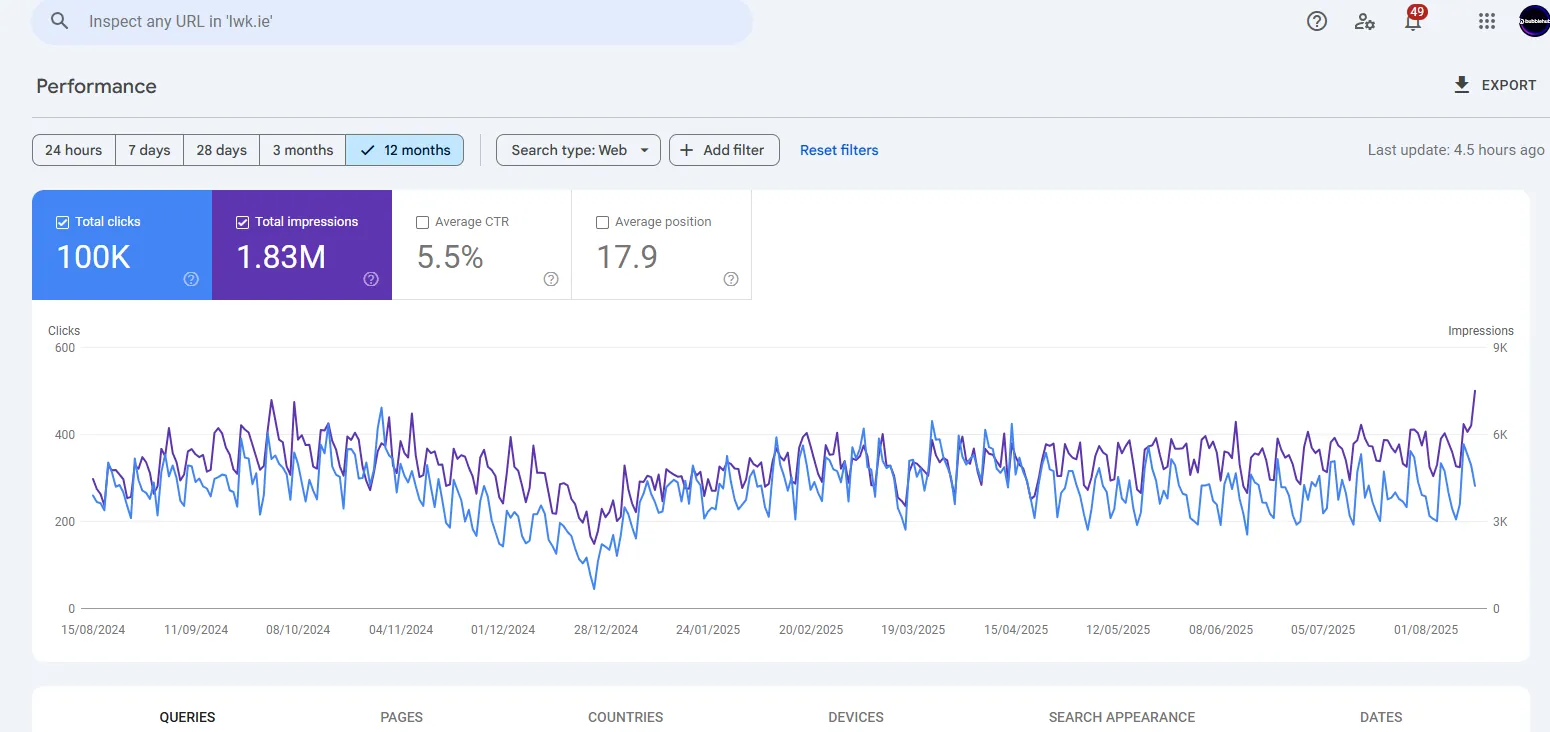
Their profit margins improved 22% in the first quarter post-migration. Not from selling more initially, but from keeping more of what they sold. The saved money went into Google Ads and content creation, which drove further growth.
Three store owners and what happened next
A dropshipper, from €450 a month in apps to €50
A seller of electronics used dropshipping. They started on Shopify because the setup seemed easier. After a year, they were paying €450 monthly in app fees for features they needed. They switched to WordPress. The same features now cost them €50 monthly. The saved €400 goes into advertising. Revenue increased 60% with better margins.
A jewellery maker whose blog brings 70% of their traffic
A jewellery maker handcrafts pieces with unique stories behind each one. Their blog brings 70% of their traffic through content about their creative process, gemstone meanings, and jewellery care. WordPress puts the writing and the shop in the one place. Each blog post naturally leads to products. Their email list of 10,000 engaged subscribers came from content upgrades. Platform cost? €35 monthly total.
A retailer in Dublin and why Shopify suited them
But not everyone needs WordPress. A retailer in Dublin is the case for Shopify being the right choice for the right business.
They had been selling personalised gifts and accessories for weddings, new babies, and children through Facebook and Instagram. When they outgrew social selling, they needed a proper website that could handle their complex product setup. Every single item is customised for the buyer. Names, dates, colours, special messages, each order is unique.
They came to us at Bubblehub Media, and Shopify was the right answer for them.
Their business model needed solid order management more than SEO flexibility. They needed simplicity for managing hundreds of personalisation options more than checkout customisation. They needed reliable support more than cost savings.
We built them a Shopify store that handles the complexity. Customers can preview their personalised items before ordering. The checkout process guides them through options without confusion.
720% in the first year
In the first year, sales increased by 720%.
The owner says the ongoing support matters as much as the site itself. They know they can ask us to manage SEO, run Google Ads, and help with any issues that arise. For them the platform is the thing the business runs on, and it takes the personalisation without them chasing it.
What the three have in common
Each of them chose correctly for their own situation. The 720% store stayed on Shopify. The 60% store moved to WordPress.
Platform success depends on alignment with business needs, not platform features in isolation.
How to build the WordPress store
You’ve decided on WordPress. Here’s exactly what you need.
Start with a hosting provider you trust, and move up a plan as your traffic grows.
Install WordPress and add WooCommerce. Choose a lightweight theme built for WooCommerce.
For payments, connect Stripe or PayPal directly, and check their current rates before you choose.
At the start, you need a security plugin, a backup plugin, an SEO plugin and, if the budget allows, a caching plugin.
Start with this basic setup. Add features as you need them. Don’t install twenty plugins on day one. Build gradually. Test everything. Keep it simple initially.
Total monthly cost for a professional starter store? It depends on your hosting plan and how many premium plugins you buy. No surprise fees. No growing app bills. Just predictable costs you control.
The ecommerce platform migration reality
Already using another platform? Switching requires planning.
Moving from Shopify to WordPress preserves your products, customers, and basic content. But URLs need extensive redirects to maintain SEO. Themes must be recreated. Apps need replacement with plugins or custom code. Checkout requires rebuilding. Email automation needs a fresh setup.
A migration takes planning, and its cost depends on how complex the store is.
Moving from WordPress to Shopify is simpler for basic elements, but you lose customisation, advanced features and URL flexibility.
Only migrate if long-term benefits significantly outweigh transition costs and risks. Sometimes staying put and optimising makes more sense than switching.
Making your decision
The choice between WordPress and Shopify is a question of fit, not of which one is better.
Choose WordPress if you want lower long-term costs, complete customisation control, stronger SEO control, content marketing integration, and freedom from platform restrictions. You’ll need basic technical willingness, patience for initial setup, and comfort with responsibility.
Choose Shopify if you value immediate setup, managed infrastructure, zero technical requirements, and predictable simplicity. You’ll pay more monthly, accept platform limitations, and work within their system.
Both platforms power successful stores. Both have strengths and weaknesses. Neither is perfect for everyone.
The key is matching platform characteristics to your business reality. Not your hopes. Not your fears. Your actual situation right now.
Build an ecommerce site today, not tomorrow
Perfect timing doesn’t exist. Perfect platforms don’t exist. But perfect procrastination definitely exists.
Pick one. WordPress or Shopify. Start building. You’ll learn more in one week of actual building than in months of research. You can always adjust, optimise, or even switch platforms later. But you can’t recover time spent hesitating.
The platform matters less than getting the shop open.
WordPress or Shopify? The real answer is whichever one you’ll actually use today. Not tomorrow. Not next week. Today.
Need help deciding between WordPress and Shopify?
If you want to talk through the choice, contact us. No obligation.