



A LinkedIn company page is the business page on LinkedIn. It is separate from your own profile. It shows what the business does and who works there. Customers and staff can follow it.
LinkedIn says: “You can create a LinkedIn Page for free.” The set-up is one short form. You need a personal LinkedIn profile first.
What do you need before you create a LinkedIn company page?
Check these seven things before you start.
- A personal profile. LinkedIn says: “You must have a LinkedIn profile to create a Page, and you can’t convert a profile into a Page.”
- Your real name. LinkedIn asks you to create the profile with your real first and last name.
- A confirmed email address. Confirm the email address on your personal account.
- More than one connection. LinkedIn’s troubleshooting page says the account must have more than one connection with another member. Send invitations to people you know before you start.
- An account that is at least one day old. LinkedIn says a new account must wait at least one day before it can create a page.
- A verified workplace. LinkedIn says you may need to verify the work experience on your profile. It offers work email verification or Microsoft Entra Verified ID.
- No page for the business yet. Search LinkedIn for the business name first. If a page exists, ask for admin access. If it is a Listing Page, you may be able to claim it.
You cannot create a page on an Android phone. LinkedIn says: “Creating a LinkedIn Page is not supported on Android mobile devices.” Use a computer. The LinkedIn app on an iPhone or other iOS device can also create a page.
What if your business already has a LinkedIn page?
A page may exist already. Someone may have made it years ago. LinkedIn may have created a Listing Page for the business. Every Listing Page carries a banner that says so. Search under the name customers know and under the legal name.
Do not make a second page. A duplicate splits your followers, and only LinkedIn support can merge it.
If the page shows a Claim this page button, click it. LinkedIn shows the button only to people who are eligible. If you do not see it, click More on the page. Then click Request admin access.
Prepare before you ask. List your role at the business in the Experience section of your profile. Verify your work email if LinkedIn offers it. Follow the page. Make sure you have not blocked it.
A current super admin must approve your request. If nobody replies, contact LinkedIn support about your request. Support will not tell you who the admins are, and it may ask you for more information.
How do you merge a duplicate LinkedIn page?
If the business already has two pages, LinkedIn support can merge them. You cannot do it yourself. You must be a super admin of both pages, and the names on both pages must match.
Send support the exact company names, the URLs of both pages and the page to keep. Followers copy across to the page you keep. The merge cannot be reversed.
Posts and analytics on the other page do not move, and you can no longer open them after the merge. Save anything you need first. Ad accounts do not move either.
Admins of the merged page do not automatically become admins of the page you keep. Add them again by hand. Job posts stay active but do not move to the page you keep.
How do you create a LinkedIn company page?
Follow these steps on a computer. The screens use a made-up roofing business as the example.
Step 1. Open the For Business menu
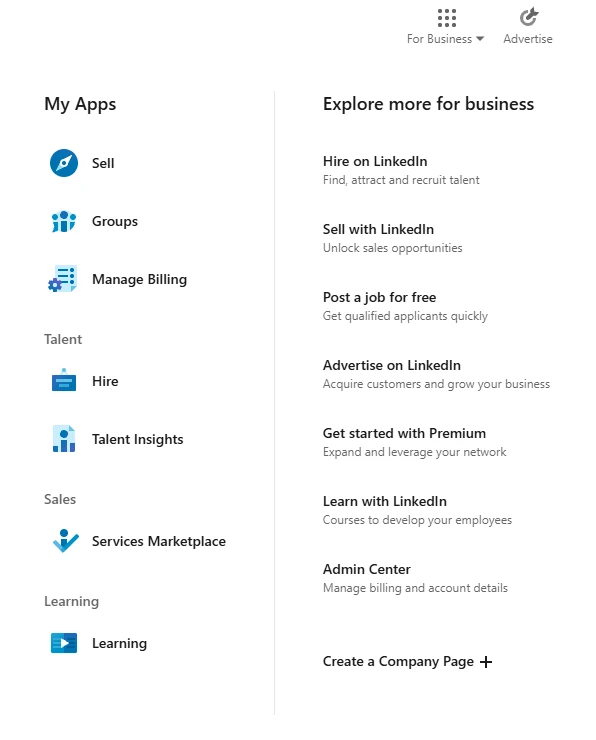
Click the For Business icon in the top right corner of the LinkedIn home page. Click Create a Company Page at the bottom of the menu.
Step 2. Choose the page type
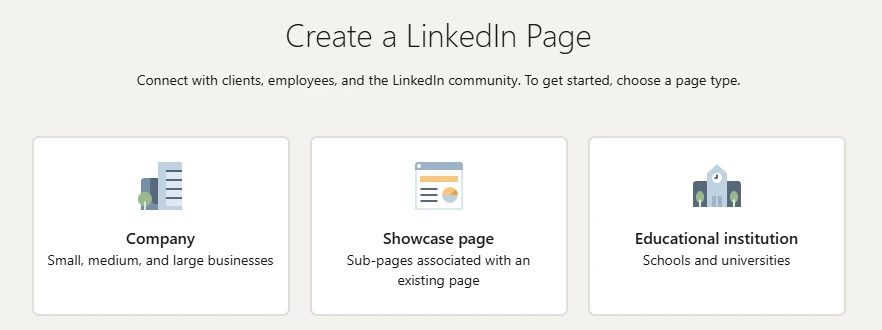
LinkedIn shows three page types. Choose Company for a business of any size.
- Company is for small, medium and large businesses.
- Showcase page is a sub-page that belongs to an existing page.
- Educational institution is for schools and universities.
Step 3. Fill in the details
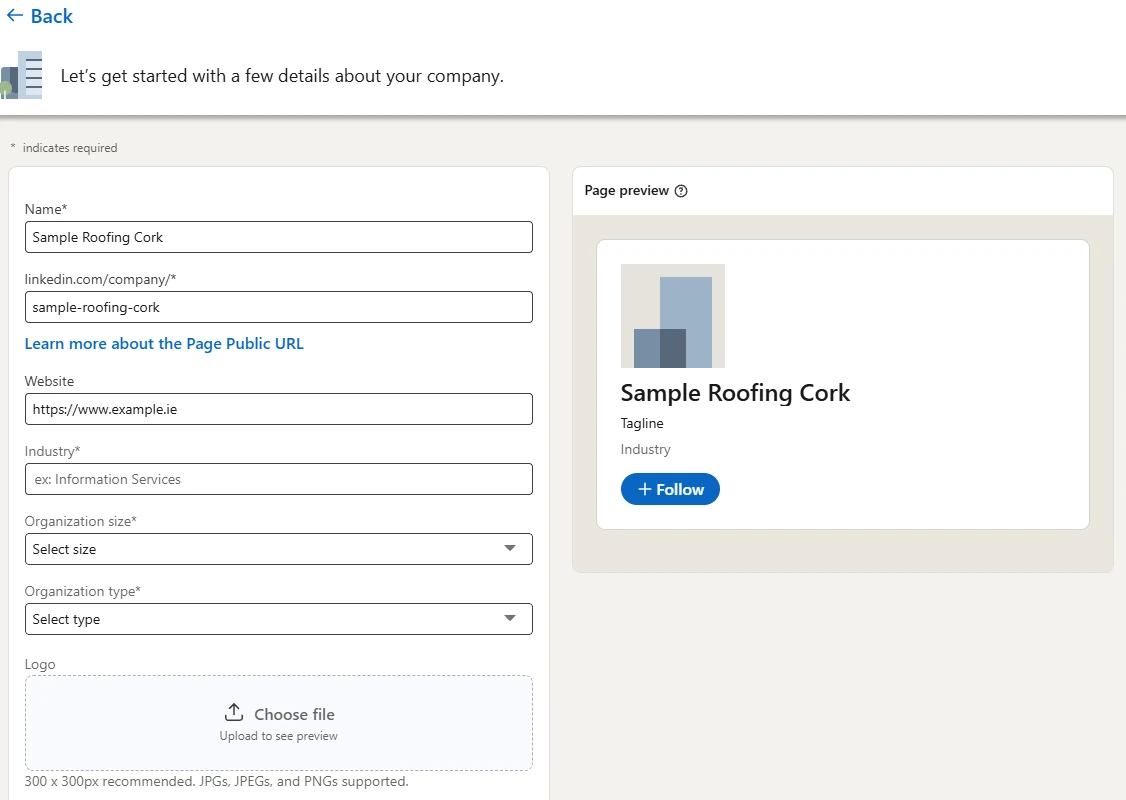
The form asks for the details below. Type each one and watch the preview on the right.
- Name. Use the name customers know.
- Public URL. The address has the form linkedin.com/company/your-name. LinkedIn fills in a suggestion. Edit it if you want a shorter one.
- Website. Enter the full address of your website.
- Industry. Pick the closest match from the list.
- Company size. The form calls this field “Organization size”. Pick the size that fits your staff numbers.
- Company type. The form calls this field “Organization type”. Pick the type that fits the business.
- Logo. The form recommends 300 x 300 pixels. It accepts JPG, JPEG and PNG files.
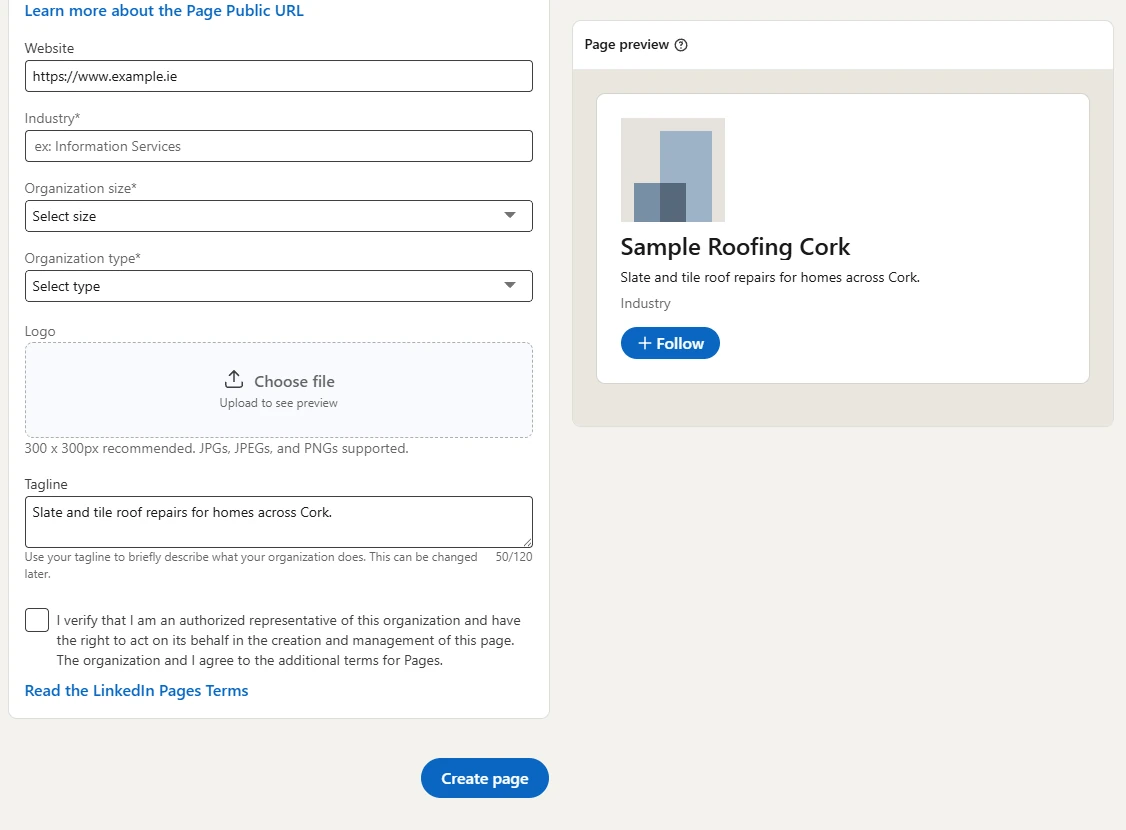
- Tagline. The limit is 120 characters. Say what the business does in one line.
Step 4. Confirm and create the page
Select the box that confirms you may act for the business. The box text begins “I verify that I am an authorized representative of this organization”. Click Create page. Then click Start building your page.
You are now the super admin of the page. LinkedIn says you can assign other people as admins.
How do you complete the page?
A new page is almost empty. LinkedIn says pages with complete information “such as logo, description, and website URL are more discoverable”. It also lists industry, company size and overview as required sections.
Add these items first:
- The logo.
- The overview and the description. Write what you sell, to whom and where.
- The website address.
- The location.
- A call-to-action button.
The button offers these choices: Visit website, Contact us, Learn more, Sign up, Register, Give, Volunteer, Request demo, Buy now and Request services. Choose Contact us or Request services for most service businesses.
LinkedIn says a Premium Company Page shows the button at the top of the page, in the feed and in search results.
For the cover image, use our LinkedIn banner size guide. It gives the sizes and says what the logo covers.
How do you add admins to a LinkedIn company page?
Add at least one more super admin on day one. Choose someone who is likely to stay.
A page has no log-in of its own. Admin roles belong to personal profiles. If your only admin leaves the business, you must request admin access like any other member. If nobody answers, you must contact LinkedIn support.
Do not share your own password to get round this. LinkedIn says sharing log-in details goes against its Professional Community Policies.
- Open the page in the super admin view.
- Click Settings in the left menu.
- Select Manage admins.
- Click the Page admins tab.
- Click Add admin.
- Search for the person and select the name.
- Select the role.
- Click Save.
The person must be a 1st, 2nd or 3rd-degree connection of yours, and must follow the page. Each person can hold one page admin role.
LinkedIn has three page admin roles:
- Super admin has every permission, including adding and removing admins.
- Content admin creates and manages posts and events.
- Analyst reads the page analytics.
How do you get your first followers?
Start with the people who already know the business. Ask staff to follow the page. Ask customers who like your work.
LinkedIn also lets you invite your connections. Click Invite to follow in the left menu of the admin view. Pages get monthly invitation credits. All admins share them. The limit renews on the first day of each month.
You may see Unlock invites. LinkedIn shows it if you have not filled in all the required sections. Fill them in, and it opens. Without a Premium Company Page, you can invite only 1st-degree connections.
What should a small business post on its LinkedIn page?
Post work that a customer would want to see. Good examples are a finished job, a new service and a staff introduction. Keep each post short. Use a real photo of real work.
Owners often find that posts from their own profile get more response than posts from the page. A new page has few followers, so few people see its posts.
The page does a different job. A customer checks it to see that the business is real. LinkedIn also says a page must be attached to your ad account before you can run Sponsored Content.
So post from both. Use the page for finished jobs, new services, staff introductions and hiring. Use your own profile for tips and opinions.
Check the results in the admin view. Click Page posts in the left panel to see analytics for each type of post. Keep the types that get a response and drop the rest.
A page does not replace your website. Link to the page on your site, and link from the page to your site. Our guide to social media marketing in Ireland explains how LinkedIn fits with the other networks.

Can you get a verified badge?
Yes, if the page is eligible. LinkedIn has a verification badge for pages. It says the badge “helps signal that the page is an official page of the organization.” Only a super admin can ask for it, and only on a computer. Go to Settings, then Verification controls. If the option is missing, the page is not eligible yet.
You must prove that you control the website. The request shows as Pending while LinkedIn checks it. LinkedIn says this can take up to 48 hours, depending on your domain provider.
LinkedIn says eligibility “may be based on meaningful engagement with LinkedIn, such as posting regularly, or responding to members.” It also counts a commercial relationship with LinkedIn. Recurring products like Ads, Jobs or a Premium Company Page subscription can show one. LinkedIn says that meeting the criteria “does not guarantee verification.”
Is a LinkedIn company page the same as LinkedIn ads?
No. A page is free and ads are paid. The page is where customers look you up. Ads put a message in front of a chosen group.
If you plan to run ads, read our guide to LinkedIn advertising costs. We also run these campaigns as a LinkedIn ads agency.
Questions people ask about a LinkedIn company page
How do you create a company page on LinkedIn?
Click the For Business icon. Click Create a Company Page. Choose Company. Fill in the name, URL, website, industry, size, type, logo and tagline. Confirm that you may act for the business and click Create page.
Is it free to have a company page on LinkedIn?
Yes. LinkedIn says: “You can create a LinkedIn Page for free.” A Premium Company Page is a paid subscription with extra features.
How much does a LinkedIn company page cost?
The basic page costs nothing. A Premium Company Page is a paid subscription.
Can you create a company page on LinkedIn without a personal profile?
No. LinkedIn says you must have a profile to create a page. You also cannot convert a profile into a page.
How many connections do you need to create a company page?
LinkedIn says your account needs more than one connection with another member. A new account must also wait at least one day. Send invitations to people you know first.
Should you create a separate LinkedIn page for your business?
Yes, if you want a page that more than one person can manage. LinkedIn says: “LinkedIn Pages represent collective organizations, while LinkedIn profiles represent individuals.”
What size should the LinkedIn logo be?
The form recommends 300 x 300 pixels. It accepts JPG, JPEG and PNG files.
Why are you unable to create a company page on LinkedIn?
LinkedIn lists the usual causes. A page with that name may exist already. Your account may have fewer than two connections or be under a day old. You may have made too many pages in a short time, or the URL may be taken. LinkedIn may also ask you to verify your workplace. Android phones cannot create pages, so use a computer or an iPhone.
How do you get admin access to a LinkedIn company page you did not create?
List your role in the Experience section of your profile and verify your work email. Then open the page, click More and choose Request admin access. A super admin must approve it. If nobody replies, contact LinkedIn support.